One long video. Viral clips in minutes.

Optimised for Danish Swedish Norwegian and works in any language

Turn podcasts, videos and Twitch or Kick VODs into captioned clips.

Works with YouTube Twitch VODs Kick VODs

or upload a video file. Try 10 clips free for 3 days, no card needed.

NordClip watches the whole episode, picks the moments that stand on their own and cuts them into captioned clips.

Podcast episode16:9 · 12:13

0:00 / 12:13

0:006:0712:13

Finding the best moments

Jay-Z og færdigheder der ganger0:40 · Danish
What to do when unsure0:23 · English
You only need rich once0:17 · English
Skru ned for tvivlerne0:31 · Danish

+ 1 more, ranked by hook, clarity and a clean ending

Når du er i tvivl

Captions

English speech, captioned in Danish

13 caption styles

9 quick colours or any colour

æøåäökept intact

Top of the clipBottom of the clip
Original, 16:9
Clip, 9:16
Finished clip

Clip length

0:54
Cut dead air: On

SpeechPauseFiller8.6 s of pauses and filler sounds cut

Example from a 12-minute podcast episode. Viral Score decides how many clips a video this long gets; processing time depends on length and queue.

Ready to post onTikTokInstagram ReelsYouTube ShortsYouTubeLinkedIn
Stored in the EUDeleted after 30 daysCancel anytime

Most clip tools are built for English. It shows.

On Danish, Swedish and Norwegian they split words, drop letters and write your titles in English. NordClip is tuned for all three.

A typical English-first tool

NordClip

The English-first example shows typical errors. It is not a test of a named product.

Speak one language. Caption in another.

Pick the language spoken in your video and the language you want the captions in. Titles are translated too. Translated captions appear line by line.

Spoken in Danish

Vi burde have startet podcasten for flere år siden.

Captions in English

We should have started the podcast years ago.

How it works

Give every clip the right shape.

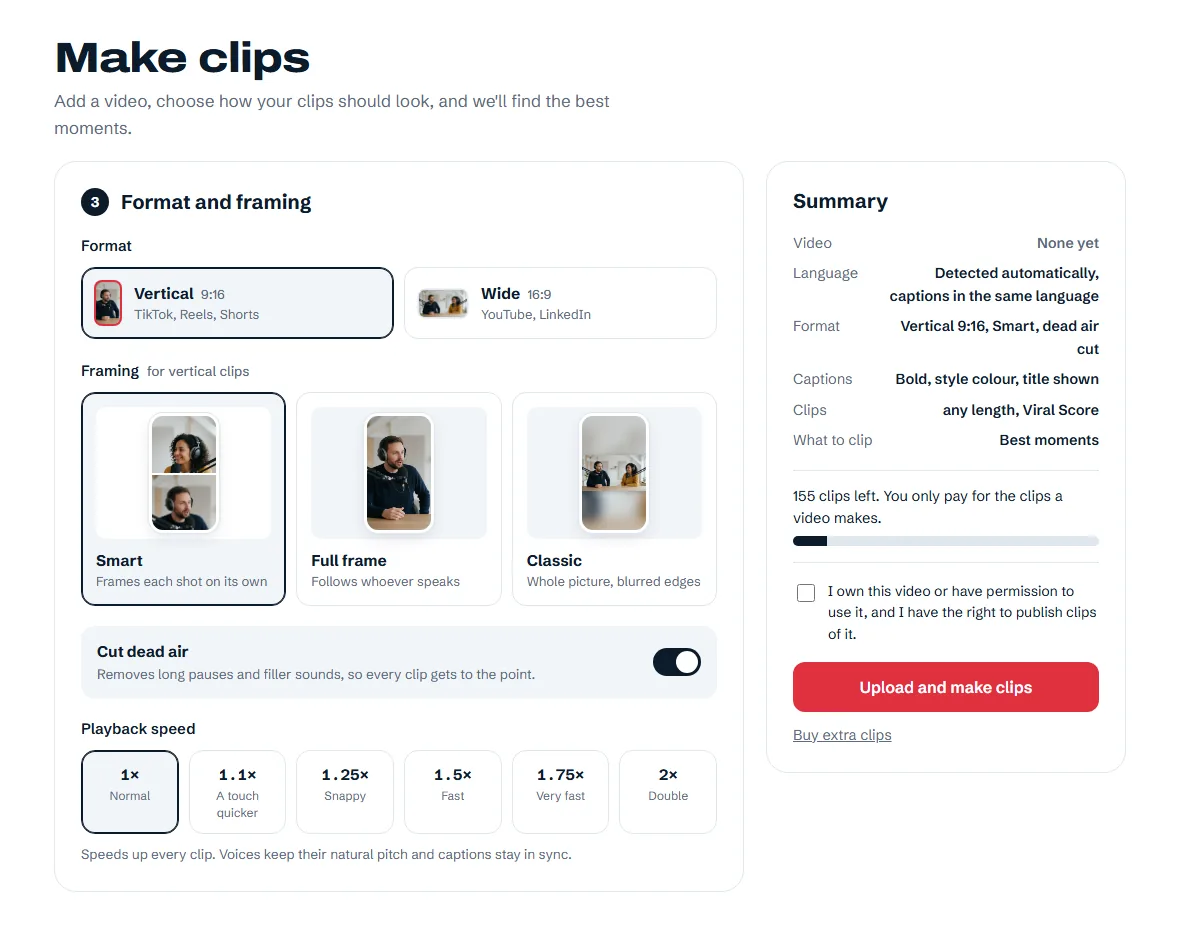
After you create your account, this is where you make clips. Add your video, choose the look and let NordClip find the moments worth sharing.

  • Add your videoUpload a file or paste a public YouTube, Twitch or Kick VOD link.
  • Choose your lookPick your format, framing, caption style and playback speed.
  • Preview before you postWatch each ready clip, then download the ones you want to share.
Take a look inside
Format and framingExample screen
NordClip studio showing vertical and wide formats, framing choices and playback speed
The real interface, shown with example data.

Everything a clip needs, done for you.

Example captions

Captions in your style

Pick a style and your own highlight colour. Every clip keeps it.

Start before you feel ready

Speaker framing

Automatic framing looks for speakers and adjusts the crop. Preview your clips, especially after camera cuts.

Vertical and wide

9:16 for TikTok, Reels and Shorts. 16:9 for YouTube on Creator and Studio.

9:16
16:9

Your clip library

Preview everything and download what you like.

Pay for the clips you get, not the minutes you upload.

Start with 10 free clips to use within 3 days.

Start

For your first podcast or channel.

149SEK per month

Billed monthly

50 clips a month

  • Viral Score
  • Vertical 9:16 clips
  • All 13 caption styles, in your own colour
  • Captions and titles in your video's language
  • Upload files or paste links
  • No watermark on your clips
Choose Start
Most popular

Creator

For weekly shows and streamers.

349SEK per month

Billed monthly

175 clips a month

  • Viral Score
  • Everything in Start
  • Wide 16:9 clips with YouTube chapters
  • Translated captions
  • Your channel handle on every clip
  • No watermark on your clips
Choose Creator

Studio

For production companies and agencies.

849SEK per month

Billed monthly

600 clips a month

  • Viral Score
  • Everything in Creator
  • 600 clips a month for several shows a week
  • No watermark on your clips
Choose Studio

Your videos are stored in Europe and get deleted on schedule.

NordClip is built for GDPR from the start. This is what happens to your files.

About AI processing. To transcribe speech and pick the best moments, we send the audio, the transcript and a few still frames to AI providers (OpenRouter, Microsoft Azure, Anthropic and Google), which may process them outside the EU. Our privacy policy lists every provider.

EU serversVideos and clips are stored and rendered in the EU.
30 daysVideos and clips are deleted automatically 30 days after a job finishes. You can delete them sooner.
Yours to keepYou own your videos and the clips made from them. We claim no rights to them.
No trainingWe don’t sell your content or use it to train our own models.

Questions before you upload

How long does it take?

Usually just a few minutes. How long depends on how long your video is (or the part you choose): a short video is often ready in under 10 minutes, and longer videos take a bit longer. Each clip appears as soon as it's ready, so you can watch and download the first ones while the rest are still being made. You can close the tab while it works.

How does the free trial work?

You get 10 clips to try NordClip, with no card needed. The trial lasts 3 days, and trial clips carry a small nordclip.com watermark. It never turns into a paid plan by itself. If you pick a plan within the 3 days, your unused trial clips move to your first paid month.

Which languages work?

NordClip is optimised for Danish, Swedish and Norwegian, both for understanding speech and for writing captions. It also supports 26 languages for speech and captions: Afrikaans, Bosnian, Catalan, Czech, Danish, Dutch, English, Estonian, Finnish, French, Galician, German, Hungarian, Icelandic, Italian, Latvian, Lithuanian, Norwegian, Polish, Portuguese, Romanian, Slovak, Slovenian, Spanish, Swedish and Turkish. Captions and titles come in the language spoken in your video, or translated into one of the others.

How does my clip budget work?

Your plan gives you a clip budget each month. Only the finished clips you get are taken from it: if a video gives you 6 clips, it uses 6. If no clips are made, or a job fails on our side, nothing is used. Your budget refills each month, and unused clips don't carry over.

How can I make my clips last longer?

Only process the part of the video worth clipping. If you know the best moments of a 30-minute podcast are in the middle 10 minutes, switch on “Clip only part of the video” and choose those 10 minutes. A shorter part gives fewer, stronger clips, so your monthly budget goes further.

What kind of videos work best?

Videos where people talk: podcasts, livestreams, interviews, debates and talks.

Can I cancel anytime?

Yes, from your account at any time. You keep your plan until the end of the period you paid for. If you change your mind within 14 days of subscribing, you can withdraw and get a refund for the clips you haven't used.

Can I upload videos I don’t own?

Only with permission from the rights holders and the people in the video. You confirm this before every upload, and we remove content when a rights holder asks us to.
Your next episode, clipped in minutes.

Upload an episode and get clips ready to preview. Your first 10 clips are free for 3 days.

Works with YouTube Twitch VODs Kick VODs